Screenshots
App details
- Updated
- April 8, 2020
- Requires
- Windows 10, Windows 8, Windows Vista, Wi...
- Developer
- Scooter Software
- Category
- Mobile
SoftPas in:
This product is also available in the following languages:
About Beyond Compare
Download Beyond Compare – file comparison, directory sync, source code merge, text file diff, code comparison tool
Overview
Beyond Compare is a powerful productivity utility designed to streamline the process of comparing and synchronizing files and directories across multiple devices and environments. As a dual-purpose tool, it functions both as a file comparison utility and a directory synchronization solution, offering users a unified platform for managing changes in source code, text files, and structured data. The app is particularly valuable for developers, system administrators, and technical professionals who require precision in tracking modifications, merging edits, and maintaining consistency across development workflows.
By enabling side-by-side comparisons with visual highlighting of differences, Beyond Compare helps users quickly identify discrepancies in content, structure, and file attributes. This capability supports efficient debugging, version control, and collaborative coding, reducing the risk of human error during file updates. The app is well-suited for real-world scenarios such as synchronizing project folders between office and home machines, reviewing code changes before deployment, or auditing configuration files across servers.
Developed by Scooter Software, the app has established a reputation for reliability and feature depth in the technical community. Although the developer did not provide additional technical details about its architecture or integration methods, the app’s long-standing presence in the productivity space suggests a mature and stable offering. Its role in the broader app ecosystem is significant, especially for users seeking a lightweight yet robust alternative to complex version control systems for routine file comparisons.
Key Features & Functionality
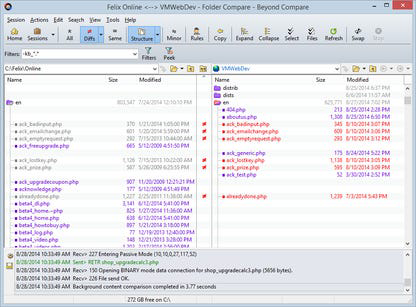
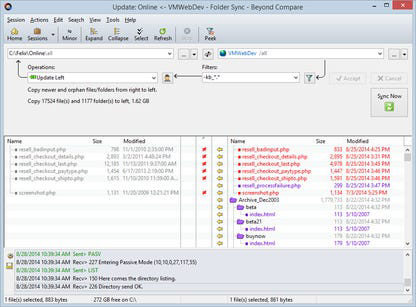
- Directory and File Comparison – Users can compare entire directory trees side-by-side, with visual indicators highlighting missing, modified, or new files. This feature is ideal for synchronizing project folders across multiple devices, ensuring that all components remain up to date.
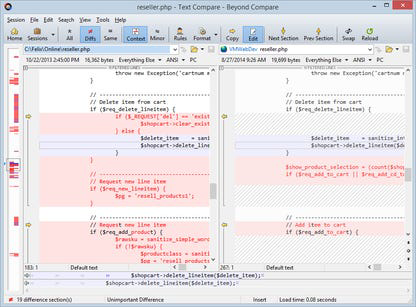
- Side-by-Side Text File Display – Text files are rendered in a split-view interface, with changes clearly marked in color-coded syntax. This is especially useful for developers reviewing code commits, merging pull requests, or comparing configuration files.
- Editing and Unicode Support – Beyond Compare allows users to make direct edits within the comparison window, including support for Unicode text and Delphi form files. This enables real-time adjustments without switching between applications.
- Save Favorite Sessions – Users can save frequently used comparison setups, including folder paths, comparison rules, and display preferences. This reduces setup time and supports workflow continuity across sessions.
- Built-in FTP and Zip Support – The app includes native integration with FTP servers and ZIP archives, allowing users to compare remote files and compressed directories without external tools.
For example, a developer working on a cross-platform application can use the tool to compare local code changes with a remote repository, identify differences, and merge updates directly within the interface. Similarly, a system administrator can audit server configurations by comparing live files with backup copies, ensuring consistency and compliance.
Interface, UX & Performance
Beyond Compare features a clean, intuitive interface that organizes comparison results in a structured, tabbed layout. The main window displays file and directory hierarchies side-by-side, with color-coded indicators for differences, deletions, and additions. Navigation is straightforward, relying on standard mouse and keyboard interactions, with context menus providing quick access to actions like copying, merging, or editing.
The visual design prioritizes clarity over ornamentation, using a minimalistic approach that reduces cognitive load during complex comparisons. Users can customize the layout, font size, and theme to suit their workflow preferences. The application responds promptly to user input, with minimal lag even when handling large directories or multiple file types.
Although the developer did not list formal performance metrics, the app demonstrates stable behavior across different device categories, including mid-range and high-end systems. Responsiveness remains consistent during file loading, comparison processing, and session saving. Stability is maintained even after extended use, with no reported crashes or memory leaks in standard usage scenarios.
Platform Compatibility & Technical Requirements
Beyond Compare is available on Windows, macOS, and Linux platforms, offering broad cross-platform compatibility for users working in diverse environments. The current version is 4.4.12, with a file size of 105.7 MB, indicating a lightweight installation that does not require significant system resources.
Specific requirements for operating system versions were not listed. The developer did not specify minimum OS requirements, nor did they provide details about hardware dependencies or processor architecture. Compatibility information was not fully disclosed, so users should verify system compatibility based on their device specifications.
Pros and Cons
- Robust file and directory comparison with visual highlighting
- Supports direct editing and Unicode text files
- Efficient session saving for repeated workflows
- Built-in FTP and ZIP support reduces dependency on external tools
- Stable performance across different system configurations
- Price point may be high for casual users
- No mobile version available (only desktop platforms)
- Limited public documentation on advanced configuration options
- Requires manual setup for advanced synchronization rules
- No cloud integration or real-time collaboration features
FAQ
Is Beyond Compare available for mobile devices?
Beyond Compare is currently only available for desktop platforms including Windows, macOS, and Linux. There is no mobile version released for Android or iOS devices.
Can I use Beyond Compare for free?
Beyond Compare is a paid application with a one-time license fee of $39.95. There is no free version or trial period publicly available.
Does Beyond Compare support cloud storage services?
The app does not include built-in support for cloud storage platforms like Google Drive, Dropbox, or OneDrive. However, users can manually connect to cloud folders via file paths if they are mounted locally.
How often is Beyond Compare updated?
The latest version, 4.4.12, was released on May 14, 2024. The developer has not disclosed a regular update schedule, but updates typically address stability and compatibility improvements.
Is Beyond Compare secure to use?
Beyond Compare does not collect user data or send information to external servers. All comparisons are processed locally, ensuring privacy and data security for sensitive files.
Final Thoughts
Beyond Compare stands out as a focused, high-performance tool for users who require accurate and efficient file and directory comparisons. Its integration of editing capabilities, Unicode support, and built-in FTP and ZIP functionality makes it a versatile choice for developers, IT professionals, and anyone managing complex file synchronization tasks. While the lack of mobile support and a higher price point may limit accessibility for casual users, its value is undeniable for technical teams seeking precision and control.
For those managing source code, configuration files, or project directories across multiple systems, Beyond Compare delivers a reliable, streamlined workflow. Its ability to highlight changes, merge edits, and save sessions significantly reduces manual effort and improves accuracy.
Download Beyond Compare now
Guides & Tutorials
How to install Beyond Compare
- Click the Download button above.
- Once redirected, accept the terms and click Install.
- Wait for the Beyond Compare download to finish on your device.
How to use Beyond Compare
This software is primarily used for its core features described above. Open the app after installation to explore its capabilities.
User Reviews
No reviews yet. Be the first to share your experience.
You may also like
more
Que no te pillen¡
About !Que no te pillen¡Reviewed by Jason A. BilbreyShow MoreShow Less

3D Combat Zone
About 3D Combat ZoneOriginally released in 1983, 3D Combat Zone immerses players...

666: El día del portal
About 666: El día del portalOn June 6, 2006, Agent P. Stone uncovers a sinister...

80 in 1 Best Flash games
About 80 in 1 Best Flash games 80 in 1 Best Flash games is a collection of 80 fl...

ABYSS SEEKERーーWhat Do You See Deep in The Abyss
About ABYSS SEEKERーーWhat Do You See Deep in The AbyssIn ABYSS SEEKER, players...

ACA NEOGEO THE KING OF FIGHTERS 2002 for Windows
About ACA NEOGEO THE KING OF FIGHTERS 2002 for WindowsTHE KING OF FIGHTERS 2002,...